How to Integrate the Carrier Lookup API: A Step-by-Step Guide for Developers
Posted on Jan 12, 2026
by Tim Smith
6 min read

Summary
Phone number verification isn’t just a nice-to-have anymore, it’s essential for any application handling SMS, voice calls, or user authentication. This is where CarrierLookup shines.
Carrier Lookup offers a developer-friendly API that instantly identifies mobile carriers, verifies phone number validity, and provides critical routing data to help you send messages more efficiently.
What is the Carrier Lookup API?
The Carrier Lookup API is a RESTful service that returns detailed information about any phone number in real time. When you send a phone number to the API, it responds with the carrier name, line type (mobile, landline, or VoIP), and whether the number is currently active.
Common Use Cases
Developers integrate carrier lookup functionality for several practical reasons:
- Spam Filtering: Identify disposable or VoIP numbers that are often used for spam or fraud. By filtering these out before they enter your system, you can maintain a cleaner user database and reduce abuse.
- Routing Optimization: Different carriers have different delivery rates and costs. When you know which carrier handles a phone number, you can route your SMS or voice traffic through the most reliable and cost-effective channels.
- Compliance Checks: Regulations like TCPA in the United States have specific rules about contacting phone numbers. The Carrier Lookup API helps you stay compliant by identifying line types before you send messages.
- Deliverability Improvements: Invalid or disconnected numbers hurt your sender reputation. By validating numbers upfront with the Carrier Lookup API, you can remove bad numbers from your lists and improve overall delivery rates.
Why CarrierLookup Stands Out
CarrierLookup differentiates itself through accuracy, speed, and ease of use. The API returns real-time data from authoritative telecom databases, ensuring you’re working with current information.
Response times typically clock in under one second, making it fast enough for real-time validation during user signups. And because it’s a simple REST API, you can integrate it into any application regardless of your tech stack.
Part of the OnTimeTelecom Family
Looking for trusted mass notification & voice broadcasting tool?
Explore DialMyCallsPrerequisites for API Integration
Before you start coding, you’ll need to set up a few things:
- CarrierLookup Account: Sign up for a free account at CarrierLookup. You’ll need this to generate your API key and manage your lookup credits.
- API Key: Once logged in, navigate to your Carrier Lookup Dashboard and generate your Authentication Token. This key authenticates all your API requests.
- Development Environment: The CarrierLookup API works with any language that can make HTTP requests. For this tutorial, we’ll use Node.js.
- Testing Tools: While not required, tools like Postman or cURL make testing API requests much easier during development.
Step-by-Step Carrier Lookup API Integration Process
Step 1 – Generate Your API Key
Log in to your CarrierLookup account and head to the API settings section of your dashboard. Click “Generate New API Key” and you’ll receive a unique authentication token. This key is what identifies your account and tracks your Carrier Lookup Credits usage.
Treat your API key like a password. Never commit it to public repositories, expose it in client-side code, or share it in documentation. Use environment variables to store it securely in your application.
Step 2 – Make Your First API Request
Let’s start with a simple cURL command to verify the API is working:
# curl -X GET \

  "https://api.carrierlookup.com/v1/lookup?number=15551234567&key=YOUR_API_KEY" \

  -H "Content-Type: application/json" #
Here’s what each parameter does:
- number: The phone number you want to look up
- key: Your API key for authentication
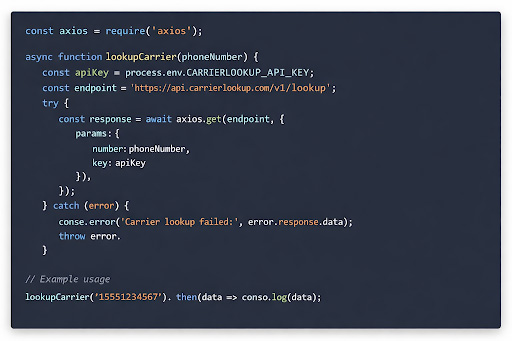
In the image below, we do the same thing in Node.js using the built-in fetch API to make an HTTP GET request, see the API Response and error handling.
Step 3 – Interpret the API Response
When your request succeeds, the CarrierLookup API returns a JSON Response with detailed carrier data. Here’s what a typical response looks like:
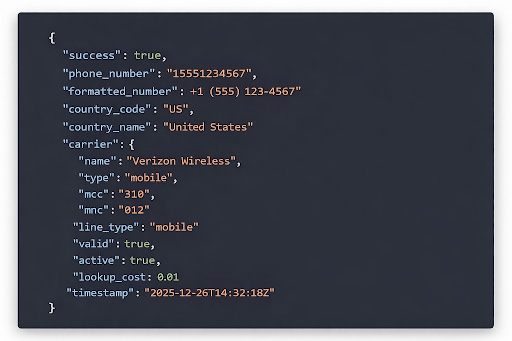
Let’s break down the key fields:
- carrier.name: The name of the telecommunications company that owns this number (e.g., Verizon, AT&T, T-Mobile)
- line_type: Whether this is a mobile, landline, or VoIP number
- valid: Boolean indicating if the number format is correct and exists in telecom databases
- active: Whether the number is currently in service (disconnected numbers return false)
This carrier data intelligence gives you everything you need to make informed decisions about how to handle each phone number in your system.
Step 4 – Integrate It Into Your Application
Now that you understand how the API works, let’s look at a practical integration example. Here’s how you might validate phone numbers during user signup:
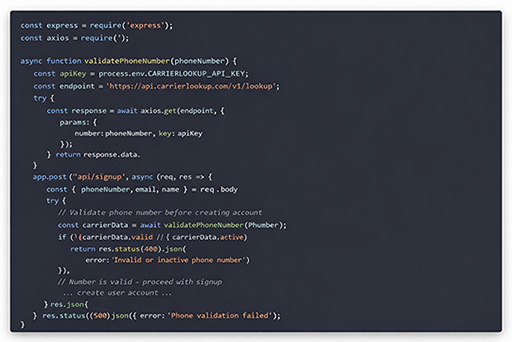
This example shows three common validation scenarios:
- Filtering invalid numbers: Before sending verification SMS messages, you confirm the number is valid and active
- Blocking problematic line types: You can reject VoIP or landline numbers if your application requires mobile numbers
- Capturing carrier information: Store the carrier name for future routing decisions
You could extend this further by routing SMS messages through different providers based on the carrier, or flagging accounts that use disposable number services.
Common Use Cases of Carrier Lookup API
Beyond basic validation, developers use the Carrier Lookup API for several advanced scenarios:
- Pre-validation in Signup Forms: Check phone numbers in real time as users type them, providing immediate feedback about number validity before form submission.
- Bulk List Cleaning: Run your entire contact database through the API to identify and remove disconnected or invalid numbers before launching campaigns. This is particularly valuable for companies using DialMyCalls or similar bulk messaging platforms.
- Two-Factor Authentication: Ensure users are registering with legitimate mobile numbers that can receive SMS codes, reducing fraud and improving account security.
- Compliance Automation: Automatically categorize numbers by line type to ensure you’re following TCPA guidelines when sending marketing messages.
Troubleshooting & Best Practices of CarrierLookup API
Common API Errors
- Response Code 401 (Unauthorized): Your API key is missing or invalid. Double-check that you’re passing the correct key parameter and that it hasn’t been regenerated or revoked.
- Response Code 400 (Bad Request): The phone number format is incorrect. Make sure you’re entering the number in the right format with no spaces or special characters.
- Response Code 429 (Too Many Requests): You’ve hit the Rate Limiting threshold. The CarrierLookup API has reasonable rate limits to prevent abuse. If you’re doing bulk lookups, implement exponential backoff or batch your requests with delays.
- Response Code 402 (Payment Required): Your Carrier Lookup Credits have run out. You can purchase additional credits at 1¢ per request with no expiration date.
Best Practices
- Implement Error Handling: Network requests can fail for many reasons. Always wrap your API calls in try-catch blocks and handle errors gracefully.
- Log Responses for Analytics: Store API responses in your database to track trends like invalid number rates, common carriers in your user base, and potential fraud patterns.
- Monitor Your Usage: Keep an eye on your API quota through the Carrier Lookup Dashboard to avoid unexpected service interruptions.
- Secure Your API Key: Use environment variables in development and secure secrets management in production. Never hardcode your Authentication Token in source code.
Conclusion
Integrating the Carrier Lookup API is straightforward, fast, and immediately valuable for any application dealing with phone numbers.
Whether you’re building a startup MVP or scaling an enterprise communication platform, the ability to verify and understand phone numbers at the API Endpoint level is essential.
Ready to get started? Sign up for CarrierLookup today and get your API key. Your first lookup takes less than a minute, and with credits at just 1¢ per request that never expire, there’s no risk in trying it out.
Start integrating CarrierLookup today, get your API key at CarrierLookup.com.
Carrier Lookup API Frequently Asked Questions
What is the CarrierLookup API used for?
The CarrierLookup API is used to identify the mobile carrier of any phone number, verify whether numbers are valid and active, determine line types (mobile, landline, or VoIP), and gather routing information for SMS and voice applications.
How much does the CarrierLookup API cost?
CarrierLookup costs just 1¢ per lookup request, with no monthly fees or subscriptions. Credits never expire, so you only pay for what you use.
Does the CarrierLookup API support international numbers?
Unfortunately, the CarrierLookup API is only available in the US at the moment. Support for international phone numbers may roll out in the near future.
How can I get my CarrierLookup API key?
Sign up for a free account at CarrierLookup.com, then navigate to your dashboard and click “Generate API Key” in the API settings section. Your key will be displayed immediately and can be used right away in your applications.
Which programming languages are supported for integration?
The CarrierLookup API is a standard REST API that works with any programming language capable of making HTTP requests. Popular choices include Node.js, Python, and PHP. You can also test requests using cURL or tools like Postman before implementing in code.
How accurate is the CarrierLookup API?
CarrierLookup maintains high accuracy by querying authoritative telecom databases in real time. The API reflects the current state of phone numbers, including recent ports and disconnections. While no lookup service can guarantee 100% accuracy due to the dynamic nature of telecom networks, CarrierLookup’s real-time approach ensures you’re working with the most current data available.